Hosted MTA-STS and TLS-RPT
Protect incoming email with enforced TLS and get SMTP TLS reports. MTA-STS stops email interception by requiring authenticated encryption, while TLS-RPT reveals delivery issues and potential attacks.
Get started with MTA-STS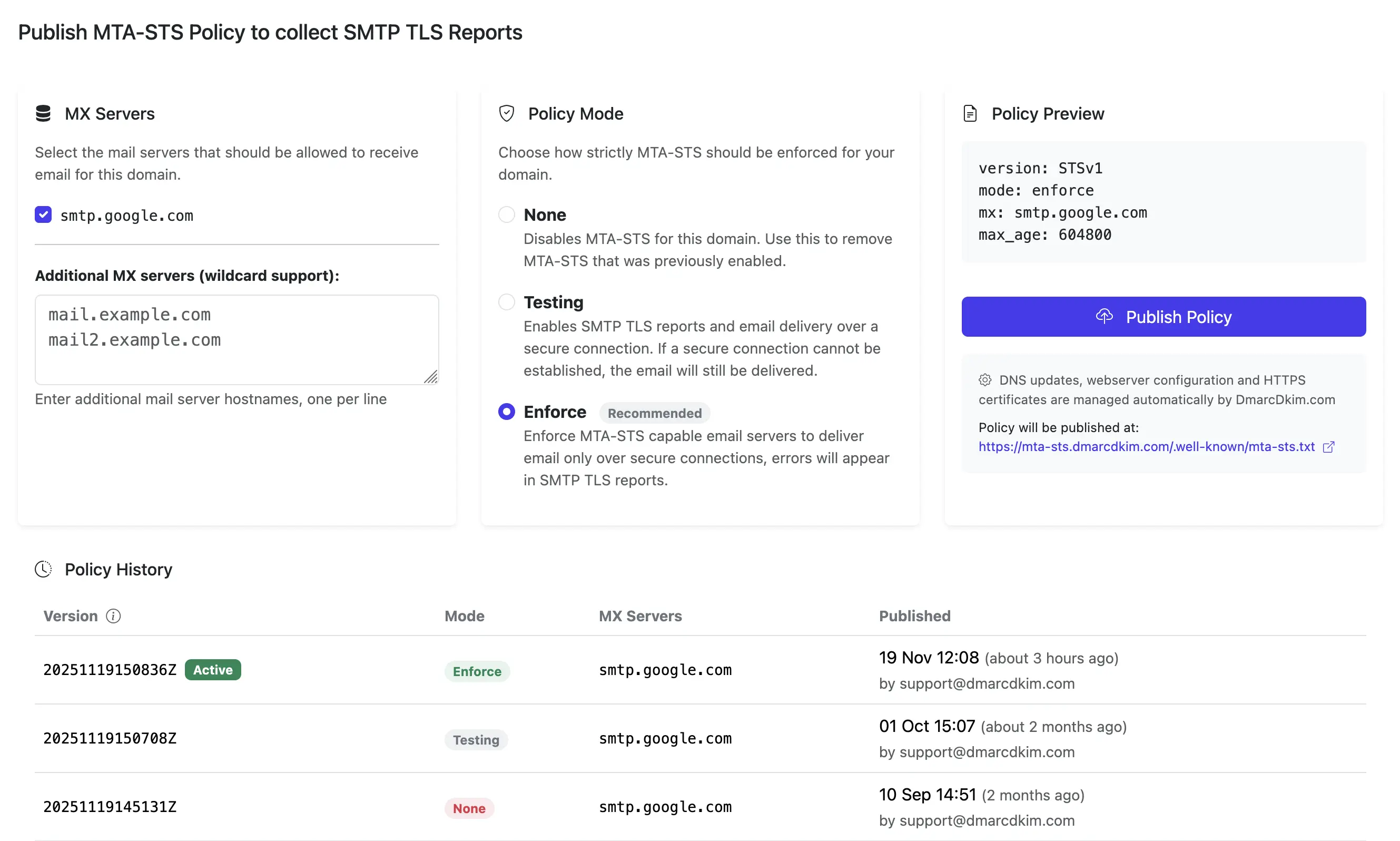
The Real Impact for You
Hosted MTA-STS and TLS-RPT aren't just about security, they protect your email confidentiality, provide visibility into delivery issues, ensure compliance, and give your team peace of mind without the complexity
Email Security You Can Trust
Enforces encrypted TLS connections with valid certificates. No silent fallback to plaintext, email is either secure or not delivered.
Full Visibility with TLS-RPT
Receive SMTP TLS reports showing delivery issues, certificate problems, and potential attacks. Know exactly what's happening with your email security.
Zero Server Management
We host the policy files, manage DNS records, and receive TLS reports automatically. No servers to configure or maintain.
Simple Setup
Get protected with MTA-STS and TLS-RPT reporting in minutes. Automatic DNS configuration, no technical expertise required.
How Hosted MTA-STS and TLS-RPT Works
We host your MTA-STS policy file at the required .well-known/mta-sts.txt endpoint on our HTTPS-enabled servers and automatically manage the DNS TXT records for both MTA-STS (_mta-sts) and TLS-RPT (_smtp._tls). You control which MX servers are authorized and the enforcement mode, we handle the infrastructure, policy version updates, and receive SMTP TLS reports on your behalf.
MTA-STS (Mail Transfer Agent Strict Transport Security, RFC 8461) is a security standard that enables mail service providers to declare their capability to receive TLS-secured connections and specify certificate validation requirements. Unlike standard email (which uses "opportunistic TLS" that silently falls back to plaintext if encryption fails), MTA-STS requires PKIX-authenticated TLS encryption with valid certificates or blocks delivery entirely.
Without MTA-STS, attackers can strip the STARTTLS command, force downgrades to plaintext, present invalid certificates, or redirect email to unauthorized servers. MTA-STS prevents these attacks by requiring valid STARTTLS support, trusted certificate validation, and MX hostname verification, with no exceptions or fallbacks.
With hosted MTA-STS and TLS-RPT, we manage infrastructure for you:
- We host the MTA-STS policy file on our secure HTTPS servers at the required https://mta-sts.yourdomain.com/.well-known/mta-sts.txt endpoint
- We automatically configure the required DNS TXT records: _mta-sts.yourdomain.com with the policy version ID and _smtp._tls.yourdomain.com for TLS-RPT
- We update policies when you make changes and refresh the policy version ID in DNS to signal updates
- We receive and process SMTP TLS reports from sending mail servers, providing you with insights into delivery issues and security events
- You just specify which MX servers are authorized to receive your email, and we handle the rest without any web server setup
Setting up hosted MTA-STS and TLS-RPT is simple:
- Verify your domain: We confirm you own the domain by checking a DNS record
- Add DNS records: We provide the exact DNS CNAME records to add at _mta-sts, mta-sts, and _smtp._tls for TLS reporting
- Select your email servers: Choose which MX server hostnames are authorized to receive your email with required TLS encryption
- Publish your policy: We generate and host the MTA-STS policy file and configure TLS-RPT reporting automatically
MTA-STS protects against several critical email security threats:
- Man-in-the-middle attacks: Prevents attackers from intercepting email between servers by requiring PKIX-authenticated TLS encryption
- Downgrade attacks: Stops attackers from stripping STARTTLS commands or forcing unencrypted connections (standard email would silently fall back to plaintext)
- Certificate validation bypasses: Requires valid, non-expired X.509 certificates with proper Subject Alternative Names, chaining to trusted root CAs (no self-signed or expired certificates)
- MX server validation: Ensures email is only delivered to MX server hostnames you've explicitly authorized in your policy, preventing DNS spoofing and unauthorized mail server attacks
MTA-STS has three policy modes that control how strictly TLS is enforced:
- Testing mode: Email is delivered normally even if TLS fails, but failures are reported via TLS-RPT (if configured) so you can see what would have been blocked. Use this to safely test your setup before enforcing.
- Enforce mode: Email is only delivered if the receiving mail server matches your policy's MX patterns, presents a valid TLS certificate, and supports STARTTLS. If any requirement fails, delivery is blocked. This is the goal for production.
- None mode: Signals that the domain no longer implements an MTA-STS policy. Use this to cleanly discontinue MTA-STS.
Most organizations start with testing mode to identify any issues, then switch to enforce mode once everything is working correctly.
TLS-RPT (SMTP TLS Reporting, RFC 8460) is a complementary standard that provides aggregate reports about TLS connection issues from sending email servers.
Think of it as the monitoring system for MTA-STS: if something goes wrong (like a certificate expires, TLS negotiation fails, or validation errors occur), sending mail servers will report these issues in aggregate reports.
With TLS-RPT, you can detect misconfigurations (expired certificates, missing TLS support, certificate validation failures), identify potential attacks, and troubleshoot delivery issues before they become critical. It's highly recommended to use TLS-RPT alongside MTA-STS to gain visibility into your email security posture.
Sign up and verify your domain ownership to get started with hosted MTA-STS and TLS-RPT.
Add the DNS records we provide and select your email servers to protect.
We host and manage your MTA-STS policy and TLS-RPT configuration automatically. Your email is now protected with full visibility.
MTA-STS Policy Modes Explained
MTA-STS policies have three modes that control how strictly TLS encryption is enforced. TLS-RPT provides reporting in all modes to help you monitor and troubleshoot. Choose the right mode for your security needs and deployment stage.
Policy:
| enforce | testing | none | |
|---|---|---|---|
| What it does | Requires senders to deliver only via MX hosts matching policy patterns with valid TLS certificates | Allows senders to attempt secure delivery, but deliver anyway if it fails (while reporting failures) | Signals the domain no longer implements MTA-STS policy |
| If MX matching, certificate validation, or STARTTLS support fails | Senders MUST NOT deliver the message | Senders deliver the message but report the failure via TLS-RPT | Senders use standard opportunistic TLS (may deliver unencrypted) |
| Do you get failure reports? | |||
| Is it safe against attacks? |
Full protection |
Only visibility |
|
| When to use it | Confident everything is secure and working to reach full protection | Testing setup before going strict |
|
Why Email Encryption Matters
Standard email uses "opportunistic TLS", it tries to encrypt connections but silently falls back to plaintext if encryption fails. This means attackers can force unencrypted delivery by interfering with TLS negotiation. MTA-STS prevents this by requiring secure TLS or blocking delivery entirely.
Unencrypted email is vulnerable
Without MTA-STS, email can be intercepted and read by attackers on the network path.
Certificate validation can be bypassed
Attackers can trick servers into accepting invalid or expired certificates without MTA-STS enforcement.
MTA-STS enforces security
With hosted MTA-STS, every connection must use valid TLS encryption, no exceptions, no bypasses.
MTA-STS Questions & Answers
MTA-STS (Mail Transfer Agent Strict Transport Security, RFC 8461) is a security standard that enables mail service providers to declare their capability to receive TLS-secured connections and specify requirements for SMTP certificate validation. Unlike standard email's "opportunistic TLS" (which silently falls back to plaintext if encryption fails), MTA-STS requires PKIX-authenticated TLS encryption with valid certificates or blocks delivery entirely.
It prevents man-in-the-middle attacks, downgrade attacks (where attackers strip STARTTLS commands), certificate validation bypasses, and unauthorized MX server attacks. Without MTA-STS, attackers can intercept, read, or modify email in transit, potentially exposing sensitive information.
With self-hosted MTA-STS, you need to set up and maintain a web server to host the policy file, configure DNS records manually, and update policies yourself. Hosted MTA-STS handles all of this automatically, we host the policy file, manage DNS records, and update policies when you make changes. You get the same security benefits without the technical complexity.
No, when properly configured. MTA-STS only affects how sending email servers connect to your domain's MX servers, requiring them to use STARTTLS with PKIX-authenticated encryption and valid certificates. As long as your MX servers support STARTTLS with valid X.509 certificates (which all modern mail servers do), MTA-STS will work seamlessly.
You should start with "testing" mode to verify everything works and review TLS-RPT reports for any issues before switching to "enforce" mode. In testing mode, email is delivered normally even if TLS validation fails, so there's no risk of blocking legitimate mail while you verify your setup.
Setup typically takes just a few minutes. After verifying your domain ownership, you add the DNS records we provide (or use our automatic setup). Once DNS propagates (usually within minutes), you select your email servers and publish your policy. The entire process can be completed in under 10 minutes.
No. With hosted MTA-STS and TLS-RPT, we automatically update the policy file (at https://mta-sts.yourdomain.com/.well-known/mta-sts.txt) and TLS-RPT configuration whenever you make changes. You can add or remove MX servers, change policy modes, or adjust max_age settings, and we handle publishing the updated policy content, incrementing the policy version ID in the DNS TXT record, and managing TLS reporting endpoints.
There's no manual file management or server configuration required. Sending servers detect policy updates by comparing the "id" field in the DNS TXT record to their cached policy version, prompting them to fetch the updated policy content. SMTP TLS reports are automatically delivered to our servers and processed for your review.
MTA-STS uses a two-step discovery process combining DNS and HTTPS:
- DNS TXT record lookup: Sending servers first check for a TXT record at _mta-sts.yourdomain.com containing version field "v=STSv1" and a unique "id" field tracking the policy version
- HTTPS policy file fetch: If the DNS record exists and the "id" differs from any cached policy, servers fetch the actual policy file over HTTPS from https://mta-sts.yourdomain.com/.well-known/mta-sts.txt
The HTTPS connection must use a valid certificate from a trusted CA for mta-sts.yourdomain.com, ensuring the policy is authentic and hasn't been tampered with. The policy file itself contains the mode (enforce/testing/none), max_age cache duration, and mx hostname patterns specifying which mail servers are authorized. With hosted MTA-STS and TLS-RPT, we handle both the DNS TXT record management, secure hosting of the policy file, and receiving SMTP TLS reports from sending mail servers.
MTA-STS is designed with resilient failure modes to balance security and availability:
- Cached policy available (fail-closed): If a sending server has a cached policy that hasn't expired (based on max_age), it will continue using that cached policy even if the HTTPS fetch fails. This protects you even if an attacker temporarily blocks policy discovery.
- No cached policy (fail-open): If there's no cached policy and the HTTPS fetch fails, the sender will deliver email using standard opportunistic TLS. This prevents email from being blocked indefinitely if your policy server is temporarily unavailable during first-time discovery.
- Expired cached policy: If a cached policy's max_age expires and can't be refreshed via HTTPS, senders should attempt to refresh but may continue using the expired policy or revert to opportunistic delivery depending on implementation.
The RFC recommends setting appropriate max_age values (up to 31,557,600 seconds for one year) and suggests senders proactively refresh policies before expiration. With hosted MTA-STS and TLS-RPT, we ensure high availability of your policy endpoint to maximize protection from cache-based attacks, and we receive SMTP TLS reports to alert you of any policy fetch failures or delivery issues.
Check your DMARC Setup
MTA-STS works alongside DMARC to provide comprehensive email security. Ensure your domain is properly protected with both.
DmarcDkim.com trusted by 2000+ companies