DMARC Analytics Dashboard
Stop guessing, start knowing. Get clear, actionable insights from your DMARC reports. See who sends email on your behalf, catch unauthorized senders, and fix authentication issues before they impact delivery.
Open Dashboard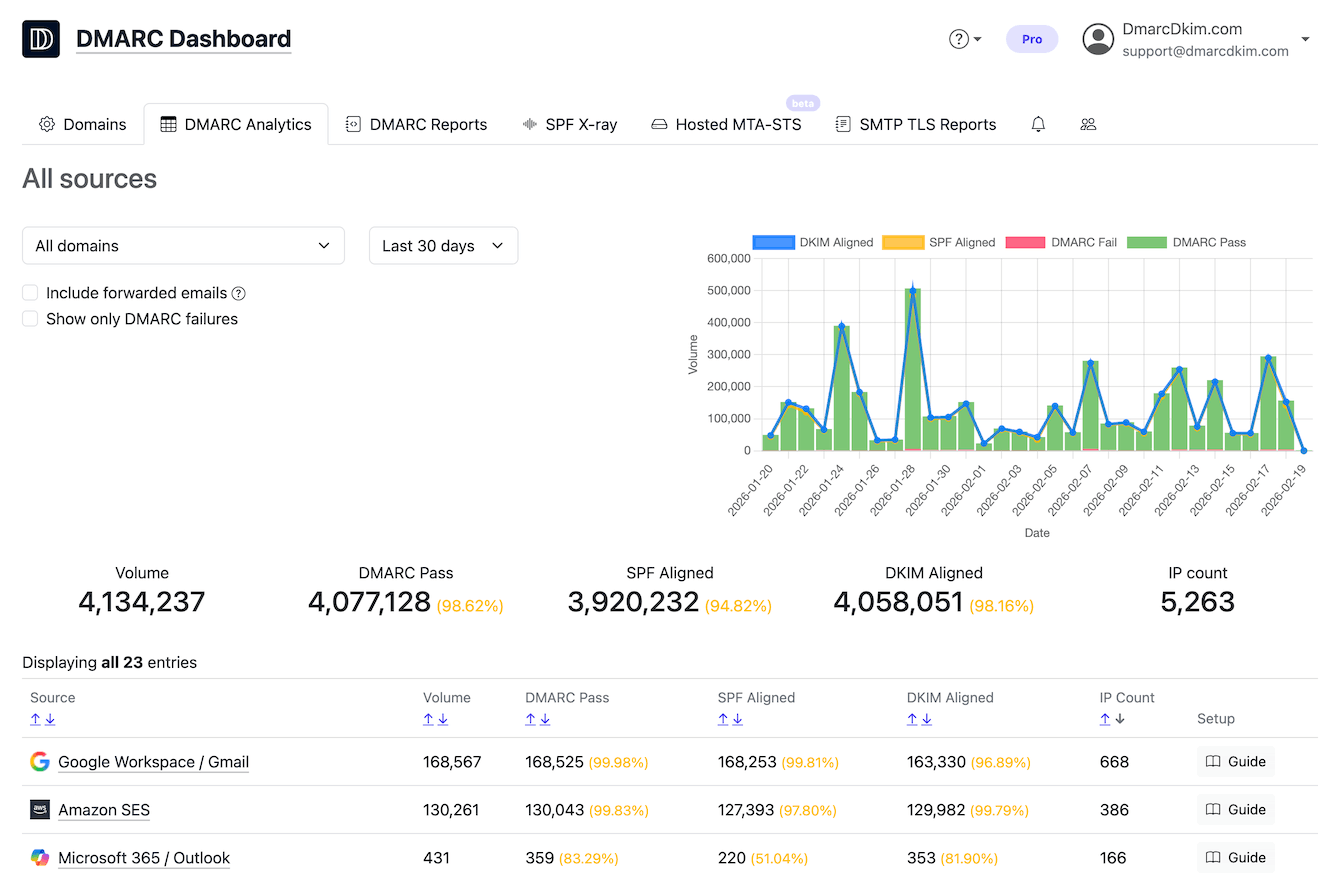
DMARC reports in minutes. Not days.
Email providers batch DMARC reports once a day. The DmarcDkim.com instant report inbox removes the wait, delivers DMARC reports in real time, and recommends the next action immediately.
Instant DMARC reports verify email authentication and point to the fix in minutes.
Try Instant ReportsSupported integrations
Chat
-
 Slack
Slack
-
 Microsoft Teams
-
 Rocket.Chat
Security stack
- SIEM
- SOAR
Any other tool
- Webhook / URL
-
 MCP
MCP
- API
Why Teams Choose DmarcDkim.com
DMARC analytics is not just about compliance. It is about knowing exactly what is happening with your email, catching problems early, and fixing them fast.
Instant Clarity
No more decoding raw XML reports. See pass/fail rates, sender details, and alignment issues at a glance.
Actionable Next Steps
Every issue comes with guided recommendations. Know exactly what DNS record to change and why.
User-friendly
Designed for everyone, from sysadmins to business owners. Clean interface, plain-language explanations.
Full Domain Protection
Monitor DMARC, SPF, and DKIM together. Catch spoofing attempts and misconfigurations in one place.
Everything You Need in One Dashboard
Visual reports on email volume, pass/fail rates, and sender activity
SPF and DKIM alignment tracking per sending source
Alerts when your DMARC policy changes or authentication fails
Track SPF and DKIM alignment across all your sending sources in real time. We highlight domains and providers that fail alignment so you can fix configuration issues before they affect delivery.
- Per-source SPF and DKIM pass/fail breakdown
- Alignment status with your DMARC policy
- Historical trend analysis for compliance tracking
Moving from p=none to p=reject is critical but risky if done blindly. Our dashboard gives you a step-by-step action plan tailored to your domain. Configure DKIM, fix SPF, and tighten your policy one stage at a time.
Result: full DMARC enforcement without breaking legitimate email delivery.
Add your domain and point your DMARC reports to DmarcDkim.com with a simple DNS change.
See your first analytics within 24 to 48 hours and identify issues immediately.
Follow our guided action plan to reach full DMARC protection and stop unauthorized senders.
Why DMARC Analytics Matter in 2026
DMARC reports are essential for email security, but raw XML data is nearly impossible to read. Without analytics, most organizations fly blind on who is sending email on their behalf.
Emails landing in spam
Authentication failures cause legitimate emails to be rejected or filtered. Analytics help you spot and fix the root cause fast.
Spoofing goes undetected
Without monitoring, attackers can impersonate your domain for phishing or fraud and you would never know.
Compliance gaps
PCI DSS v4.0.1 requires DMARC enforcement for organizations. Our Dashboard proves you are on track and audit-ready.
DMARC without analytics is like a security camera you never check. DmarcDkim.com is watching for you.
Trusted by teams worldwide



DMARC Dashboard Questions & Answers
Check Your DMARC Setup Now
Enter your domain to instantly see your DMARC, SPF, and DKIM status and find out if your emails are properly authenticated.
DmarcDkim.com trusted by 2000+ companies