DMARC MCP Server
Talk to your DMARC reports
Connect the DMARC MCP server to Claude, Cursor, VS Code or any MCP client and ask your AI assistant about your DMARC aggregate reports, failing senders, DNS history and TLS reports, in plain language. Sign in once: DNS, DMARC, DKIM and SPF lookup tools then work for any domain, no subscription needed.
Connect the MCP server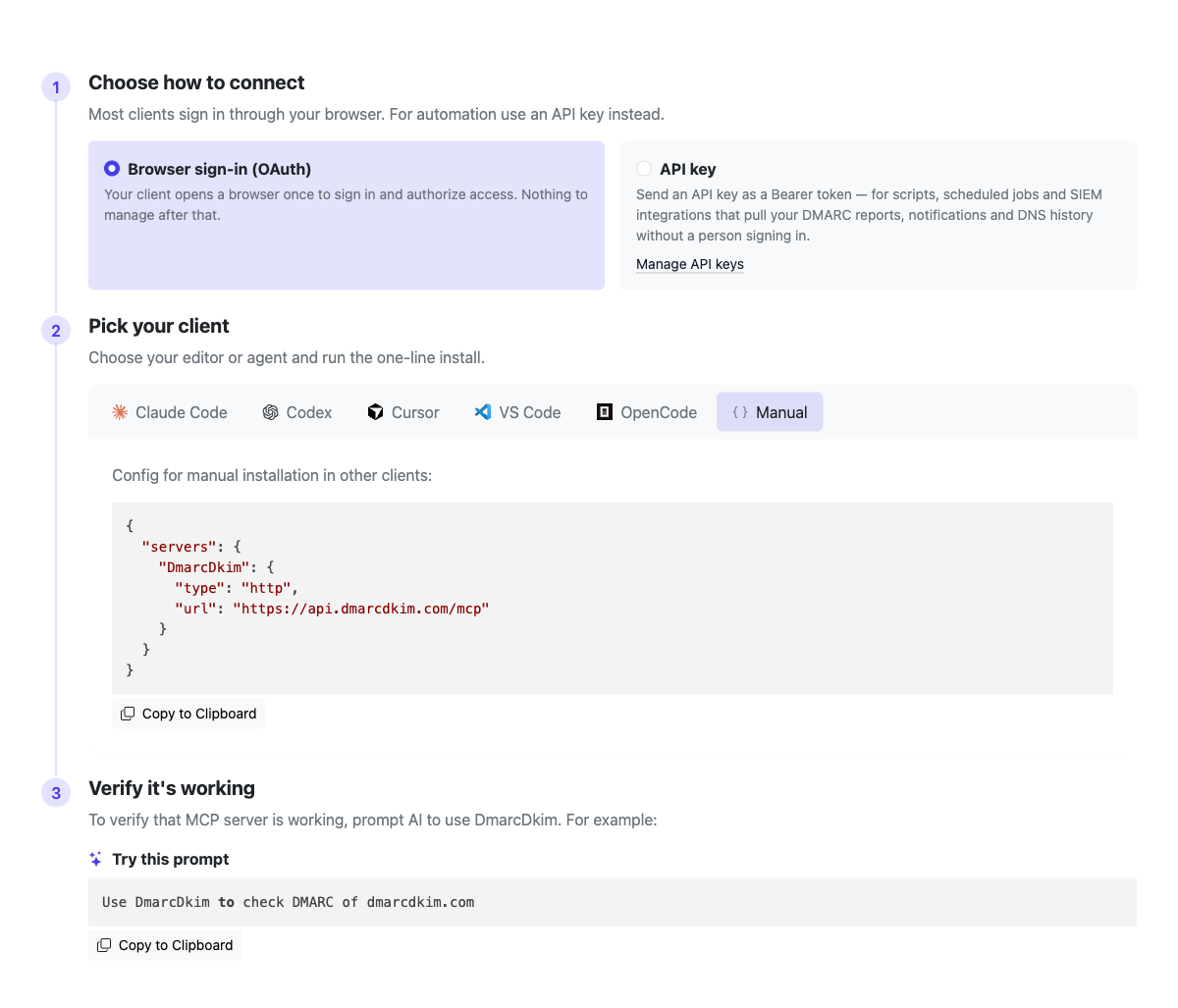
Full per-client instructions live at app.dmarcdkim.com/mcp-instructions
What you can access
Two sets of tools over one MCP server, both behind a single sign-in: account tools that read your stored DMARC data, and free lookup tools that work for any domain with no subscription.
Your account data (paid plan)
Free lookups (any domain)
Supported integrations
Chat
-
 Slack
Slack
-
 Microsoft Teams
-
 Rocket.Chat
Security stack
- SIEM
- SOAR
Any other tool
- Webhook / URL
-
 MCP
MCP
- API
Connect in under a minute
Pick your editor or agent, Claude Code, Codex, Cursor, VS Code, OpenCode or any MCP client, and run the one-line install. Interactive clients sign in through your browser; scripts and CI can use an API key.
Sign upTalk to your DMARC reports
Sign in once and your AI assistant can read your stored DMARC data, no dashboards, no XML. Ask in plain language and let it pull the reports, find the failures, and explain what to fix.
Try a prompt like:
Using DmarcDkim, summarize last week's DMARC reports for example.com — total messages, and the DMARC pass rate.
Which sending sources for example.com are failing DMARC right now? List them by message volume and say whether SPF or DKIM is the problem.
Has anything changed in example.com's DNS recently, and were there any DMARC change alerts I should know about?
Pull the latest TLS-RPT report for example.com and tell me if any sessions failed to negotiate TLS.
MCP tools & use cases
Sign in once for both. Account tools read your stored DMARC data on a paid plan. Lookup tools work for any domain with no subscription. Copy a prompt to try it.
Account tools (your stored data)
DMARC Reports
List your DMARC aggregate (RUA) reports and read any one of them: reporter, period, message volume, and SPF/DKIM/DMARC pass and fail counts. Need the raw XML? Ask for it.
What you get:
- A list of received reports, newest first, filterable by domain
- Per-report summary: reporter, date range, totals and pass rate
- Per-source records to see which senders pass or fail
- Original report XML on request
Use Cases:
- Get a weekly DMARC summary without opening a dashboard
- Track your pass rate over time
- Compare what different mailbox providers report
- Hand a report to your AI and ask what to fix first
Example:
Using DmarcDkim, list my DMARC reports for example.com from the last 30 days, then summarize the overall DMARC pass rate and name the top 3 sending sources by volume.
Found 14 reports for example.com (Jun 1–30). 248,113 messages total, 96.4% DMARC-aligned. Top sources: Google Workspace (181k, 99.9% pass), SendGrid (44k, 97.1%), and an unknown source on 203.0.113.0/24 (12k, 0% pass) — likely spoofing or an unauthenticated sender to investigate.
Failing Senders
List individual report records for a domain and filter straight to the failures. The fastest way to answer "who is failing DMARC, and is it SPF or DKIM?"
What you get:
- One row per sending source (IP), newest first
- Filter to records that fail DMARC entirely
- Filter to SPF-misaligned records
- Filter to DKIM-misaligned records
Use Cases:
- Find unauthenticated or spoofed senders
- Tell apart an SPF problem from a DKIM problem
- Check who would be blocked before moving to p=reject
- Spot a new vendor that isn't authenticated yet
Example:
Using DmarcDkim, show me the report records for example.com that are failing DMARC. For each source IP, tell me whether SPF or DKIM is the cause and the message count.
3 sources failing DMARC for example.com: 203.0.113.10 (8,204 msgs — SPF not aligned, DKIM absent: likely spoofing), 198.51.100.4 (2,011 msgs — DKIM signature present but not aligned: misconfigured vendor), 192.0.2.55 (640 msgs — SPF soft-fail: new IP missing from your SPF record).
DNS History & Change Alerts
Read the DNS changes the monitoring found on your domains, with the values before and after and each nameserver's answer, and the notifications raised when something changes, so your AI can spot a removed DMARC record or a tampered SPF entry.
What you get:
- Detected DNS changes with the values before and after
- Notifications with type, severity and a plain-language message
- Filter both by domain, and changes by time range
- Alert messages localized to your language
Use Cases:
- Audit when and how a record changed
- Catch a DMARC or SPF record that was removed or broken
- Review recent alerts in one prompt
- Reconstruct a DNS change during an incident
Example:
Using DmarcDkim, check example.com's DNS history for the last 90 days and list any DMARC or SPF changes, plus any change alerts raised — with dates and severity.
2 changes for example.com: on Jun 12 the SPF record gained include:_spf.newvendor.com (info); on Jun 28 the DMARC policy changed from p=quarantine to p=none (high severity alert — enforcement was weakened). 1 open alert: "DMARC policy downgraded", raised Jun 28.
TLS Reports
List SMTP TLS reporting (TLS-RPT) reports and read any one: reporter, period, policy count, and successful versus failed session totals. Catch TLS negotiation problems before they delay mail.
What you get:
- Received TLS-RPT reports, newest first, filterable by domain
- Successful and failed session counts per report
- Full report detail, with raw JSON on request
- Policy counts per reporting period
Use Cases:
- Spot TLS handshake failures affecting delivery
- Confirm MTA-STS and DANE are being honored
- See which providers report TLS issues
- Track TLS success rate over time
Example:
Using DmarcDkim, pull the latest TLS-RPT report for example.com and tell me whether any sessions failed to negotiate TLS, with the reporter and the failure count.
Latest TLS-RPT for example.com (Google, Jun 25–26): 19,440 successful sessions, 12 failures — all "validation failure" from one sending host, suggesting a certificate or MTA-STS policy mismatch worth checking.
Lookup tools (any domain, free)
DNS Lookup
Performs comprehensive DNS lookups for domains and IP addresses with support for all standard and email authentication record types.
Supported Lookup Types:
- Standard records: A, AAAA, MX, TXT, NS, CNAME
- Email authentication: SPF, DMARC
- Reverse DNS: PTR lookups
- Domain information: WHOIS data
- Bulk queries: "all" type for multiple records
Use Cases:
- Verify DNS record configuration
- Check email server MX records
- Retrieve SPF and DMARC email authentication records
- Perform reverse DNS lookups for IP addresses
- Retrieve domain WHOIS information
Example:
Using DmarcDkim, look up the DNS records for example.com — A, MX, SPF and DMARC — and tell me if anything important is missing for email.
example.com resolves to 192.0.2.1 and 192.0.2.2; MX is mail.example.com (priority 10). SPF: v=spf1 include:_spf.google.com ~all. DMARC: v=DMARC1; p=none; rua=mailto:dmarc@example.com. Everything is present, but DMARC is at p=none — you're monitoring only, not enforcing.
DMARC Check Tool
Validates DMARC policy records and SPF records for a domain with comprehensive error detection and reporting. This tool checks the _dmarc subdomain for DMARC policies and validates SPF record configuration.
What It Checks:
- DMARC policy records from _dmarc subdomain
- SPF records (TXT records starting with v=spf1)
- DMARC configuration errors and syntax issues
- DNS record availability and validity
Use Cases:
- Verify email authentication DNS setup for a domain
- Diagnose email delivery issues related to authentication
- Check if domain is properly configured for DMARC
- Verify SPF records are present and correctly formatted
- Get a quick overview of DMARC and SPF status
Example:
Using DmarcDkim, check the DMARC and SPF setup for example.com and tell me whether it's ready to enforce, with any errors.
DMARC: v=DMARC1; p=quarantine; rua=mailto:dmarc@example.com — valid, enforcing at quarantine. SPF: v=spf1 include:_spf.google.com ~all — valid, 4 DNS lookups (within the RFC 7208 limit). No errors. To reach full enforcement, move the policy to p=reject once your reports look clean.
DKIM Check Tool
Checks the DKIM record for a specific selector on a domain. DKIM keys live at <selector>._domainkey, so you give the selector (for example "google" or "selector1"), and the tool resolves the record, parses the tags, and analyzes the public key.
What It Checks:
- Resolves <selector>._domainkey, following CNAMEs
- Key type and bit length (RSA strength)
- Syntax errors, weak hashes and testing mode
- Revoked keys (empty p= tag) and missing records
Use Cases:
- Confirm a selector is published and valid
- Verify a new selector before rotating keys
- Check the key is long enough (2048-bit or more)
- Validate a sending vendor's DKIM setup
Example:
Using DmarcDkim, check the DKIM record for example.com on the "google" selector and tell me if the key is valid and strong enough.
DKIM found at google._domainkey.example.com: v=DKIM1; k=rsa; p=… — valid, RSA 2048-bit. Not in testing mode, key not revoked, no syntax issues. This selector is healthy and ready to sign mail.
SPF Check Tool
Validates SPF record syntax, checks DNS lookup count against RFC 7208 limits, and detects circular references.
Validation Features:
- Syntax validation and error detection
- DNS lookup count (RFC 7208 limit: 10 lookups)
- Circular reference detection in include/redirect chains
- SPF tree structure parsing with all mechanisms
Use Cases:
- Validate SPF record before deployment
- Ensure compliance with RFC 7208 (10 lookup limit)
- Detect configuration errors that could break email delivery
- Understand SPF record structure and mechanisms
Example:
Using DmarcDkim, validate the SPF record for example.com — check the syntax, the RFC 7208 ten-lookup limit, and any circular includes.
SPF: v=spf1 include:_spf.google.com include:_spf.salesforce.com include:_spf.mailchimp.com ~all. Problem: 12 DNS lookups required — over the RFC 7208 limit of 10, which causes permerror and can break delivery. No circular references found. Fix by flattening or removing an unused include (try SPF Merge).
SPF Merge Tool
Merges multiple SPF records or mechanisms into a single optimized record with duplicate removal and proper formatting.
Features:
- Removes duplicate mechanisms
- Sorts mechanisms by type and qualifier
- Preserves qualifiers (-, ~, +, ?)
- Adds recommended "~all" if missing
- Handles modifiers (redirect, exp)
Use Cases:
- Consolidate multiple SPF records into one
- Merge SPF records when migrating email providers
- Optimize SPF records by removing duplicates
- Combine existing domain SPF with new mechanisms
Example:
Using DmarcDkim, take example.com's current SPF record and merge in ip4:192.168.1.0/24 and include:_spf.newprovider.com, removing duplicates, and give me one record to deploy.
Merged SPF for example.com: v=spf1 include:_spf.google.com include:_spf.newprovider.com ip4:192.168.1.0/24 ~all. Duplicates removed, mechanisms sorted, ~all preserved. Tip: run SPF Check on the result before deploying to confirm it stays within the 10-lookup limit.
Connect Your Domain
Add your domain to start reading your own DMARC reports, DNS history, change alerts and TLS reports through the MCP server. The lookup tools work for any domain with no subscription, once you're signed in.
DMARC MCP Server: Questions & Answers
app.dmarcdkim.com/mcp-instructions after you sign in.DmarcDkim.com trusted by 2000+ companies